
Say what you want automated. Cronable builds it and runs it.
Describe what you want in plain English and the built-in AI assistant builds the whole pipeline — wiring the steps together and connecting the tools you already use. It runs on your own machine, on a schedule or a trigger, where it can reach your files and CLIs and actually get the work done — while your data and keys stay on your box by default.
No code needed · Runs on your machine · Mac, Windows or your own server
123 job types — and room for your own
Actions do the work, orchestration nodes pause and branch the chain, and triggers fire whole pipelines from an inbox, a folder, a calendar or a webhook. Need something bespoke? Ship it as an extension.
New to orchestrators, triggers and webhooks? Read the plain-language glossary.
Not a technical person? Not a problem.
Just type what you want in plain English to test whether Cronable can automate it — no cron syntax, no code.
What Cronable does
No code — describe it, the AI builds it
Tell the built-in assistant what you want in plain English. It builds the whole pipeline, wires each step to the next, reuses the logins you already have, and asks for anything it's missing. You never have to touch YAML — though you can, if you want to.
Runs on your machine — so it can do real work
Because it runs where you work, a job can reach your files, your network and your signed-in CLIs — and actually execute: install what it needs, run commands, drive Claude or Codex. A cloud tool can only call the integrations its vendor pre-built; here your data and keys stay on your box by default.
Chain it, then watch it run
Steps run in order — each one waits for the last to actually succeed, and a failure branches to a handler instead of charging ahead. Watch it all on one live canvas, colour-coded by state, instead of hunting for jobs scattered inside a chat agent.
The console you’ll actually use
Real screenshots of the Cronable web console — the same app you install on your own machine.
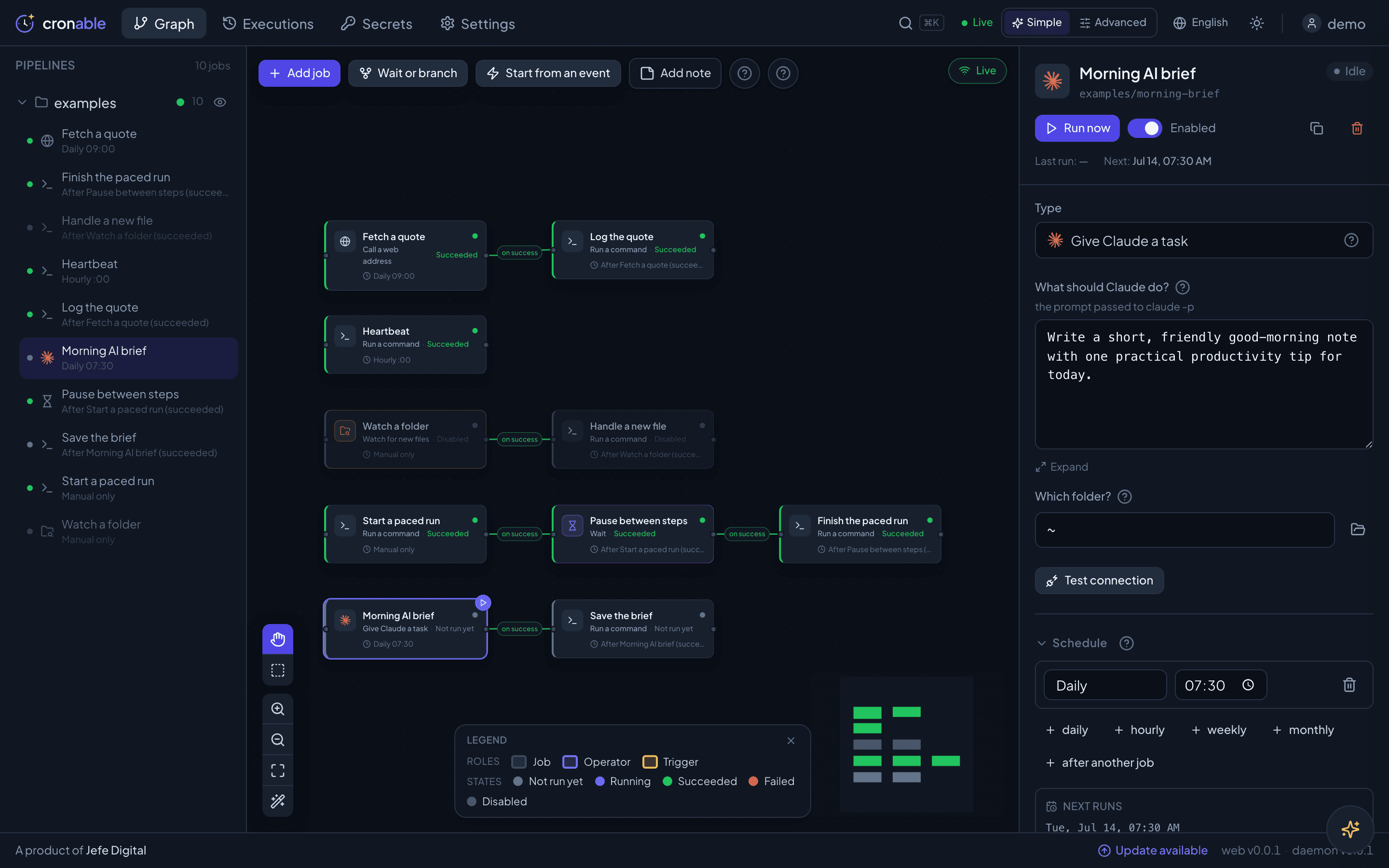
Your whole operation, as a graph
Every job is a card. An arrow means “only run if the last step succeeded.” Build chains and branching trees by dragging — the friendly Simple mode keeps the jargon out of the way.
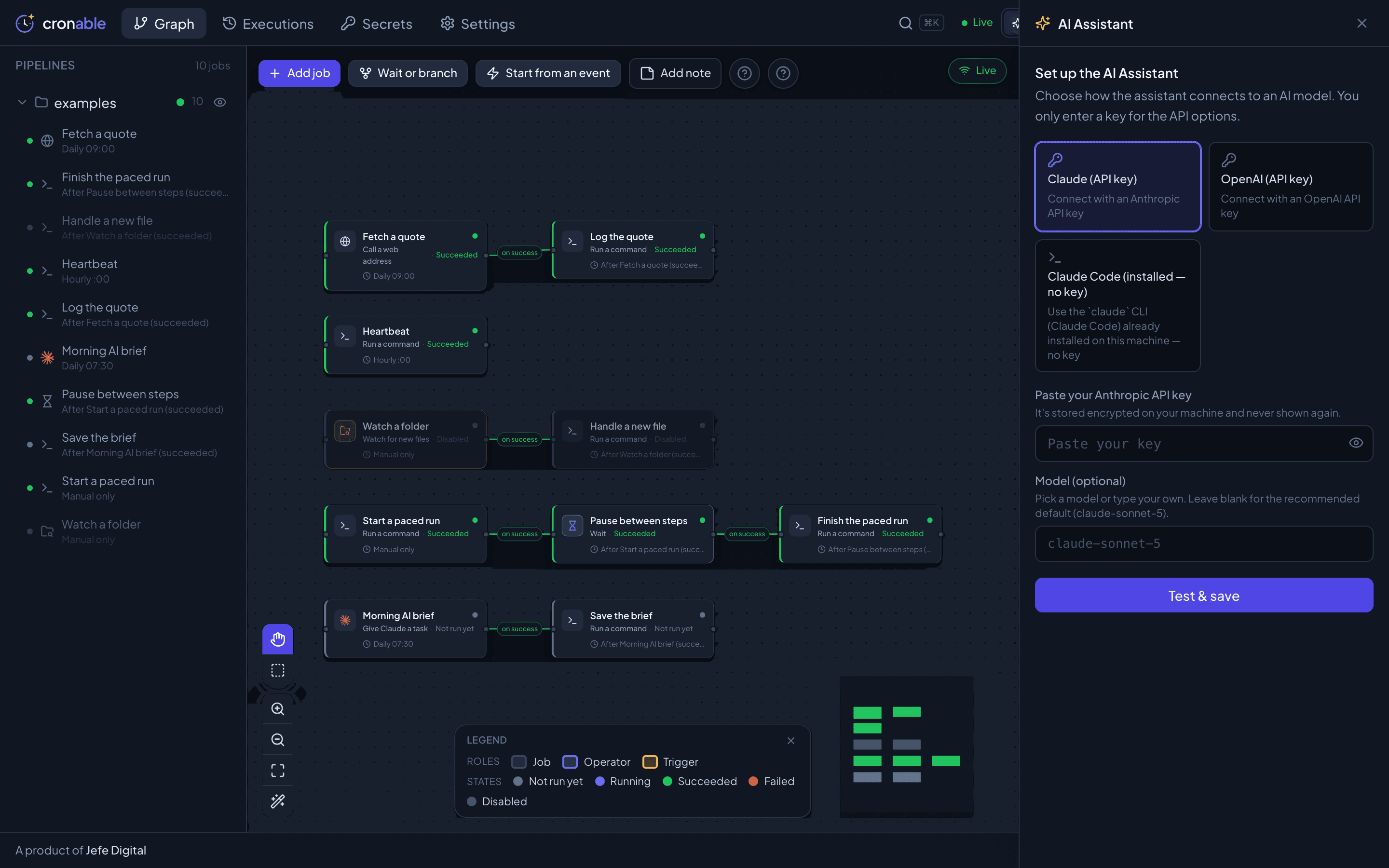
A built-in AI assistant, on your terms
Connect the assistant to your own Claude or OpenAI key — or the Claude Code CLI already on your machine, so no key is needed and nothing goes through us. Then have it help you build and edit jobs.
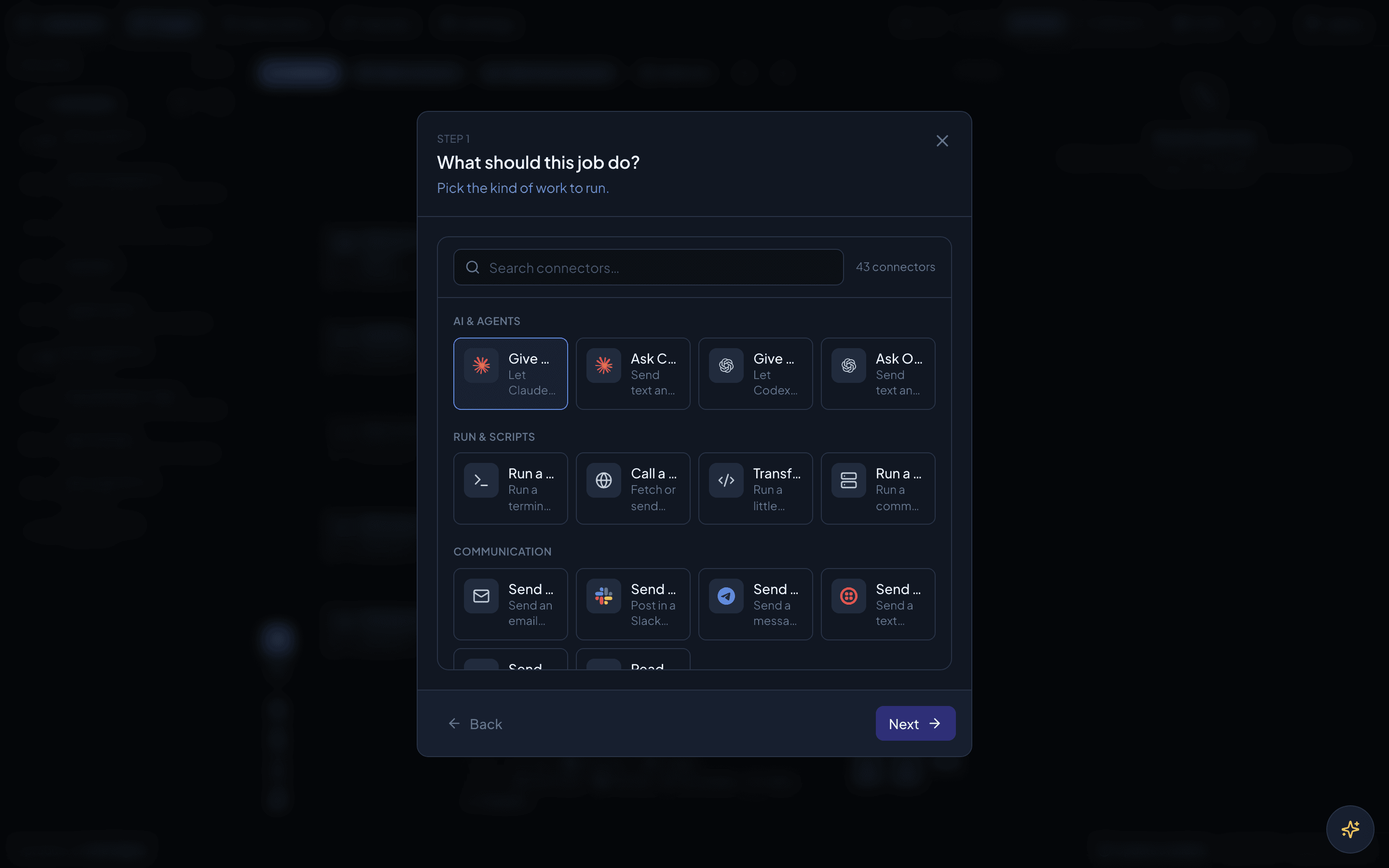
Set up a job by answering plain questions
The guided wizard asks “what should this job do?” — run a command, give Claude a task, call a web address. Pick one and fill in the blanks.
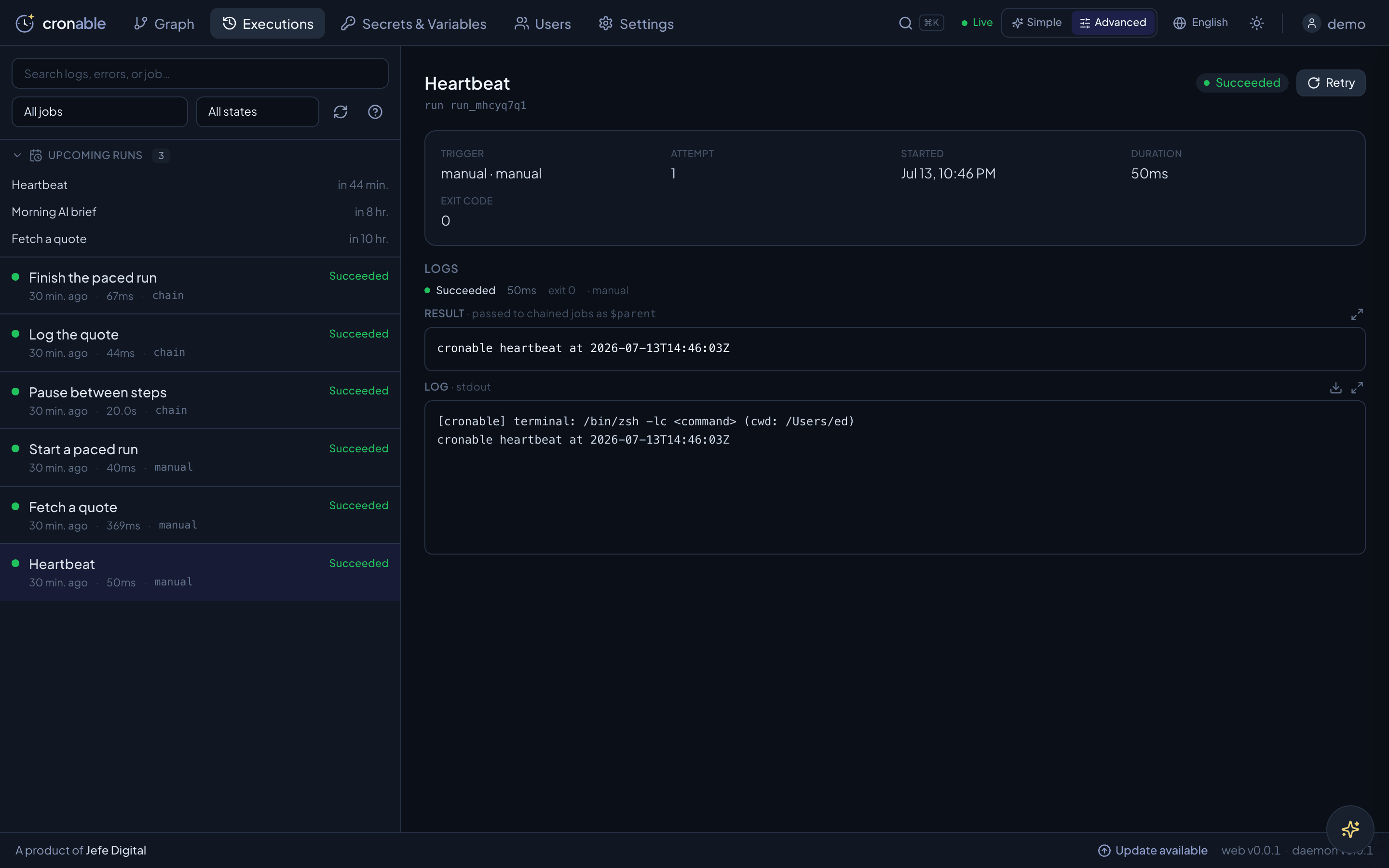
Watch every run — and why it failed
Live, colour-coded run history with the logs attached, so you always know what ran, when, and what happened.
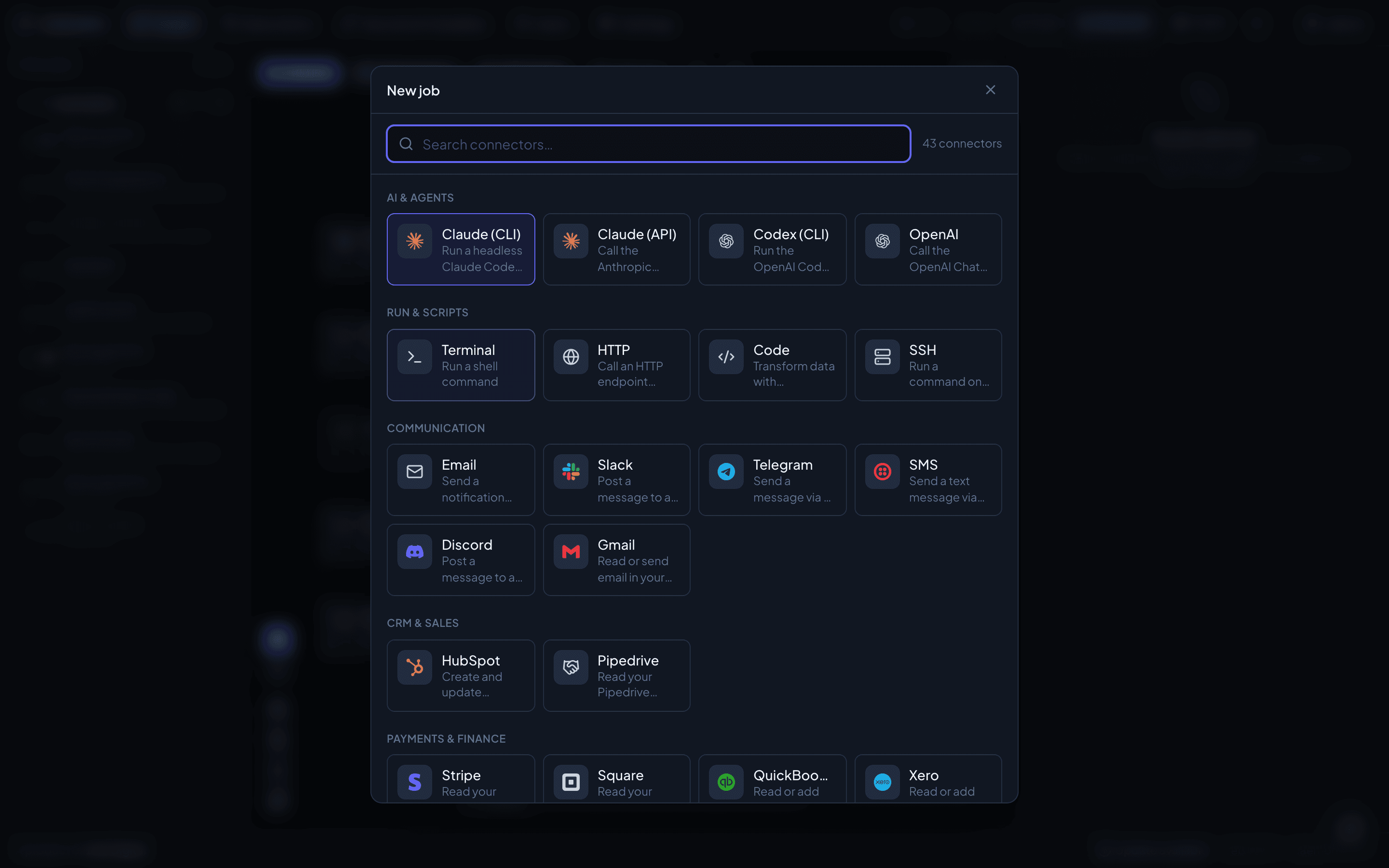
96 connectors, one search box
Add a job from a growing catalog — run Claude or a shell command, call any HTTP API, or reach Slack, Telegram, Gmail, Stripe and more. Grouped and searchable.
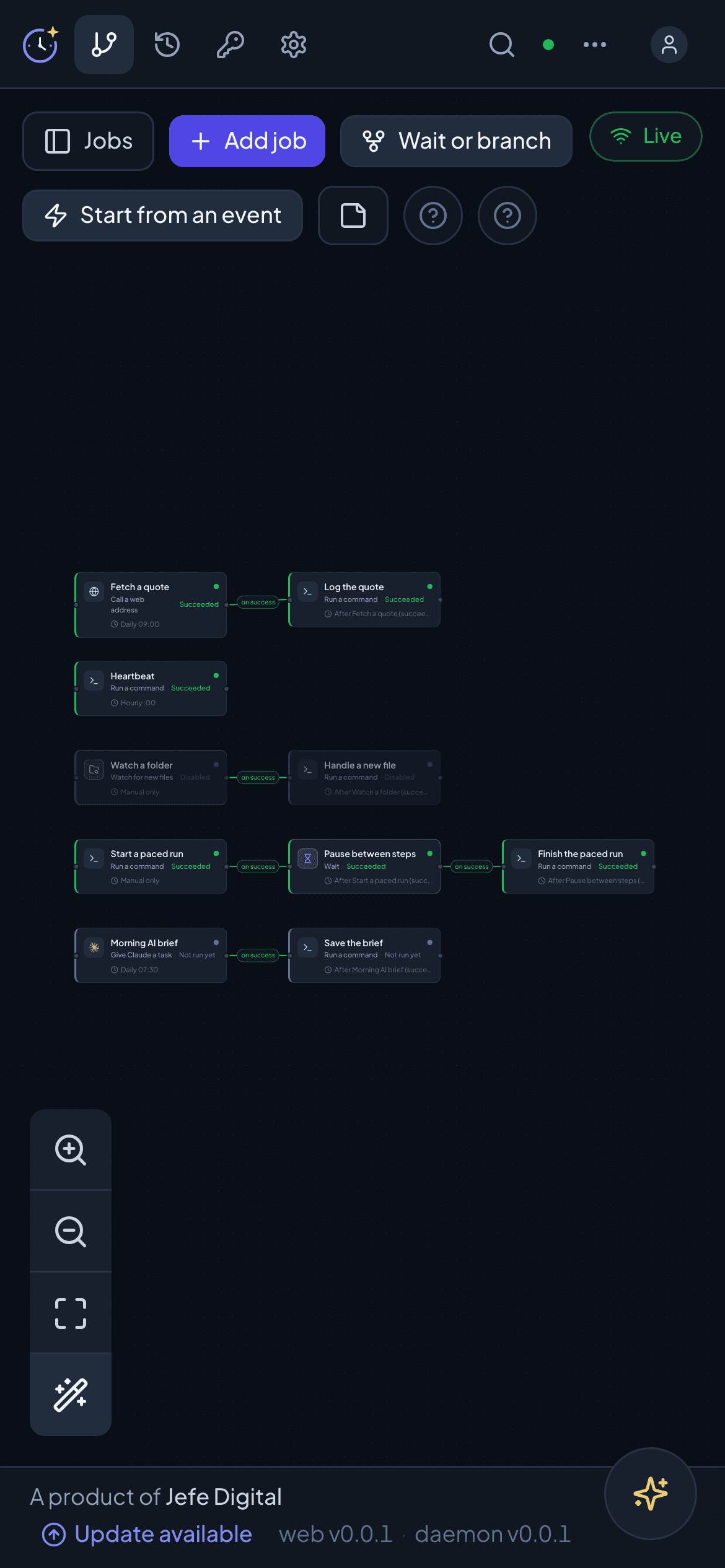
On your phone, too
The whole console is responsive — check a run or kick off a job from anywhere.
The next step runs only when the last one actually worked.
Plain cron — and a scheduled task in ChatGPT, Claude, OpenClaw or Hermes — fire on the clock and hope. Cronable builds real dependency chains and trees: every step waits for its parent to succeed, a failure branches to a handler instead of poisoning everything downstream, and each step’s output flows into the next.
New lead from your website — they’re marked “contacted” only if the reply actually sent; a bounce books a callback instead.
A cron entry or a scheduled AI task fires every step on time and hopes. When one breaks — the CRM is down, a payment fails, a post won’t publish — it charges ahead anyway: emailing leads you never saved, texting door codes for stays that aren’t paid, announcing pages that 404. Cronable stops at the broken step and hands it to a handler, so a failure becomes one task on someone’s list — not a mess your customers see.
Local isn’t just more private. It’s more capable.
Your machine is already wired into your files, network and signed-in tools — and it can do anything a computer can. Cronable runs right there, so a job inherits all of it.
Already wired into everything you use
Your files, your VPNs, your local network, your signed-in CLIs — and your AI assistant’s own tools and memory. A job on your machine inherits all of it instantly. No re-authenticating every account into someone else’s platform, no exporting your data, no new keys to hand out.
A full computer, not a fixed menu
Cloud tools can only connect what their vendor pre-built. On your machine a job can write a script, install whatever it needs on the fly, and do the thing that has no pre-built integration — which is most real work. If your computer can do it, it’s cronable.
Your data stays on your box
Your data, prompts, credentials and results are stored on hardware you control — not copied to a vendor cloud. A few optional features send some of it through us when you use them — such as the hosted AI assistant, inbound webhooks, remote control and one-click Google sign-in — and our Privacy Policy spells out each one. You hold the keys.
Run Claude headlessly on your own infrastructure
Point a job at a repo and a prompt. Cronable runs Claude headlessly through the Claude Code CLI on the same server — hands-off and fully automated, under your own AI account. Your AI calls go straight to your provider on your own key — never routed through us, and never stored by us.
- Claude runs locally via the CLI — hands-off, fully automated
- Runs under your own AI account — your tools, your control
- Choose from several AI providers and models per job
- Chain an agent’s output straight into the next step
# jobs/reports/daily-seo.yaml
id: daily-seo
group: reports
type: claude
cwd: ~/sites/example.com
schedule:
  - kind: daily
    time: "07:30"
instructions: |
  Audit example.com for SEO regressions since
  yesterday. Email me the 5 highest-impact fixes.
model: claude-opus-4-8
onFailure: alert-oncall
One agent, running every morning, hands-off on your own server.
Put the repetitive work on autopilot
A few of the things teams run on Cronable every day. If you do it on a schedule or a trigger, it can run here.
Anything you do twice is cronable.
Daily social media analysis
Every morning an AI agent reviews yesterday’s Instagram, TikTok and LinkedIn performance and posts the wins, drops and next moves to Slack.
Daily SEO analysis
Track rankings, crawl your site for regressions and land a prioritized fix list in your inbox before standup.
Weekly campaign & post ideas
An agent proposes next week’s social calendar and drafts the posts, ready for you to approve in one place.
Find leads and reach them
Discover fresh leads matching your ICP, enrich them, then email them or drop them into Google Sheets — automatically.
Morning inbox summary
Summarize your overnight email and send the digest to Slack before you sit down at your desk.
Ship a feature every day or week
Point an AI agent at a repo and a backlog — it implements, commits to a branch and opens a pull request on a schedule.
Find security holes daily
Nightly, an agent audits your codebase and dependencies for vulnerabilities and files exactly what it finds.
Analyze your service health
Ping your services, analyze the responses with AI and alert you only when something actually looks wrong.
From idea to running job in minutes
Describe it to the assistant
Say what you want in plain English. The AI assistant builds the pipeline, wires the steps and asks for any login it needs. Prefer code? Every job is a small YAML file in a git repo you own — write it directly instead.
Cronable syncs from git
Push a new job and the engine pulls it automatically. Edit in the browser and changes commit straight back. Two-way, no restarts.
Schedule, chain or trigger
Fire on an hourly, daily, weekly or monthly schedule, chain off a parent job's outcome, or trigger from a webhook, an inbox, a dropped file or an upcoming calendar event.
Watch it run live
Follow every run on the draggable DAG with streaming logs and full history — and get emailed the moment something fails.
Synced with your git repo
Jobs live in a git repository you own. Push a change and Cronable pulls it; edit in the browser and it commits back. Two-way, automatic, no restarts.
Create jobs from your AI chat
Describe a job to the built-in assistant, or from your own agent over MCP — it writes a valid job into your git repo, the system picks it up, and it just starts running.
Three ways to run it
However you like to work, you’re up and running in minutes. The engine runs on your own machine — your jobs, secrets and AI accounts stay right there by default.
Mac desktop app
Download Cronable for Mac and double-click. It runs quietly in your menu bar and manages the engine for you — no terminal, no config. Open the dashboard whenever you want.
Windows desktop app
Download Cronable for Windows. It lives in your system tray and keeps the engine running in the background — the same one-click experience as the Mac app.
Server or headless
For an always-on box, install from the command line on macOS or Linux. Operate it from anywhere through the same dashboard via remote control — your server dials out, so there are no ports to open, and your own daemon re-checks every request.
Whichever way you run it, the work stays yours — jobs, secrets, AI accounts and every command run on your own machine, and the only routine calls out are a licence check and a look for new releases.
Remote control is included on Basic and up and requires two-factor. A live remote session is relayed through Cronable’s edge (the same trust as any hosted proxy); end-to-end encryption to your own machine is a planned Enterprise option.
No more invisible jobs scattered inside a chat agent
A job you set up in OpenClaw or Hermes lives in a chat thread — to find out what’s scheduled or whether last night’s run failed, you have to ask, and trust the answer. Cronable puts every automation on one canvas, colour-coded by state, with last night’s failure already glowing red. You see it before you think to ask.
you › what ran last night, and did anything fail?
agent › let me check… the backup ran, I think. The invoice one may have failed — want me to look?
A stream you have to interrogate — a probabilistic answer to a question that deserves a definite one.
You saw the red one before you thought to ask. Click it for the masked log, the retries and the exact step.
Your infrastructure. Your data. Your keys.
Cronable is built to run like a trusted part of your own stack — your data, jobs and secrets stay on your box by default.
Runs on-premises
Install on your own server or VM — your jobs run on your infrastructure, not our cloud. No SaaS; by default your jobs, secrets and data stay on your machine.
Encrypted secrets
AES-256-GCM at rest, never written to git, and masked out of every log line.
Authenticated console
Per-user logins or OIDC single sign-on, with brute-force lockout; the engine binds to localhost.
You hold the keys
Your data and encryption keys stay with you. Every change lands in git and an audit trail.
Do it yourself, or have us set it up with you
Subscribe and get started in minutes — install the Mac or Windows app, or run it headless on your own server and reach it from anywhere. Signed updates keep it current: automatically on a Linux server installed with sudo, or with a one-line re-install on a Mac. Prefer done-for-you? We come in, map what to automate, build the workflows with you, and train your team to run them.
Self-install — or we set it up
Install the Mac or Windows app in a click, or a headless server on macOS or Linux — or have us come in, map what to automate, build the workflows with you, and train your team to run them.
Your own AI accounts
Connect your own AI accounts and MCP connections — use the tools you already have, however you authenticate. Jobs on your own accounts call the provider directly — not through us. The AI assistant messages included in each plan use Cronable’s hosted AI.
Signed updates
Every update is signed and verified before it installs. A Linux server installed with sudo updates itself in the background, with automatic rollback; a Mac updates with a one-line re-install that keeps your jobs, secrets and run history.
Support & docs
Community support + documentation on every plan; email support on Plus and Business; a dedicated SLA on Enterprise.
Frequently asked
Is it really self-hosted?
Yes. The Cronable engine installs and runs entirely on your own server or VM, and your jobs, data and secrets are stored there. Its routine calls out are a licence check, which reports simple job and user counts, and an update check. Beyond those, your content reaches us only through optional features, and only when you use them: the hosted webhook relay (for inbound webhooks), the hosted AI assistant (if you pick it over your own AI key or local Claude CLI), remote control and remote MCP (to reach your machine from outside it), one-click Google sign-in, and bug reports you choose to send. The relay holds an inbound webhook until your server collects it — for up to 24 hours — and carries remote traffic without storing it; the assistant sends your messages and what it needs to answer them to our AI provider; and a Google sign-in’s tokens wait, encrypted, only until your server collects them. Our Privacy Policy sets out each one in full.
How does Cronable access AI models?
For the jobs you build, Cronable runs Claude and other agents on your own machine using your own AI accounts and MCP connections — however you authenticate, with no markup and nothing routed through us. The built-in AI assistant is the one exception you control: point it at your own AI key or your machine’s local Claude CLI (both stay on your box), or use the zero-setup hosted Cronable assistant, which sends your messages and what it needs to answer them — your job configuration and, when you ask about a run, that run’s secret-masked output — through us to a third-party AI provider to generate replies (we meter, but don’t store, those messages). See our Privacy Policy for exactly what is and isn’t sent.
Which AI providers are supported?
Cronable ships with Claude — both the Claude Code CLI (a coding agent in a repo) and the Anthropic Messages API — and OpenAI, via the Chat Completions API and the Codex coding-agent CLI. Pick the right model and mode for each job, all running under your own AI accounts — however you authenticate — with no vendor lock-in.
Does it work with OpenClaw or Hermes?
Yes — Cronable orchestrates them. Run an OpenClaw or Hermes agent as a step in a pipeline, reuse the skills they already have, or drive Cronable from their own chat over its MCP server. They’re great for authoring a job by chatting; Cronable is where you operate it — on a visual canvas, with schedules, retries and the full history of every run. Chat to author, canvas to operate.
How is this different from cron or launchd?
Cron and launchd fire each job on a timer, blind to everything else — if the 3am export fails, the 3:05 job still runs, on whatever broken state it left behind. Cronable turns those isolated timers into a dependency graph: a step runs only when the one it depends on actually succeeded, failures branch to a handler instead of cascading, results flow from one step to the next, and you watch the whole thing on a live colour-coded canvas with per-run logs. Same one-file-per-job simplicity — none of the silent breakage.
How is this different from an AI chat agent?
A chat agent does the work but hides the state: to find out what’s scheduled or whether last night’s run failed, you have to ask it and trust the answer. Cronable makes the automation the thing you look at — a live, colour-coded canvas of every job, with the full secret-masked log of each run a click away. It also does what a single scheduled prompt can’t: run long chains and branching trees where each step fires only if its parent succeeded, failures route to a handler, and data flows from one step to the next. And plenty of jobs have no AI in them at all — a reminder, an email, an HTTP call, a database query. AI is one option, not the point.
How do we create jobs?
Three ways. Drag and drop on the visual DAG editor in the browser; describe what you want to the built-in AI assistant and it creates the job right in the console; or connect Claude or ChatGPT to Cronable’s MCP server and ask from there. The built-in AI assistant is on every plan — including Free — with a daily message limit that scales as you move up; the MCP server is on Business. However it’s made, the job lands in your own git repository, and every AI change runs under the same roles, approvals and audit as a hand edit.
Can jobs react to events, not just schedules?
Yes. Triggers start pipelines from their own source: an inbound webhook, a file landing in a watched folder, new mail in an IMAP inbox, an upcoming calendar event, a new message to your Telegram bot, a new row in a Google Sheet — and more. Webhooks arrive through Cronable’s hosted relay over a connection your server opens outbound, and every other trigger polls outward — so no inbound ports or public URLs are ever required, even behind NAT or a firewall.
With webhook triggers, does anything leave my machine?
Only the inbound event itself, and only if you use webhooks. Cronable’s daemon never opens a port; it holds an outbound connection to our relay, and third parties post to a public relay URL that queues the event and forwards it down to your server. The relay deletes each event once your server has it; if your server is offline, the event waits up to 24 hours and is then dropped. Our edge servers also log each request (IP address and headers, never the body). Nothing else leaves on account of webhooks: your jobs, secrets, credentials, AI accounts and every command Cronable runs stay put. (Other features can send content through us when you use them — such as the hosted AI assistant and remote control, which carries your dashboard traffic in transit. Our Privacy Policy covers each one.) Would you rather nothing touched the relay? The polling triggers (email, calendar, folders, Telegram, Sheets) reach out from your server and never use it.
How are secrets and access handled?
Secrets and typed credentials (API keys, bearer/basic/header auth, database connection strings) are AES-256-GCM encrypted at rest, never written to git and masked from logs. The web UI is authenticated with per-user logins — or your identity provider via OIDC single sign-on — with brute-force lockout, and every login, secret change and settings edit lands in an append-only audit trail. The engine binds to localhost and never runs as root: it runs your jobs as you, with your own access and no more, unless you choose a locked-down “cronable” user for a shared server.
Can we build our own job types?
Yes. Extensions are self-contained modules — one folder each — so your team, or ours, can add custom job types that behave exactly like the built-ins.
Can it query our database?
Yes. The database job type runs SQL against Postgres, MySQL or SQL Server using a stored connection-string credential, with proper bind parameters and row limits. Results flow downstream as JSON, so a query can feed an AI summary, a report email or any other job in the chain.
How is it priced?
Simple self-serve tiers billed monthly via Stripe: Basic, Plus and Business, metered on jobs, inbound webhooks and users — git sync and encrypted secrets are on every plan. Enterprise is custom — contact us. Cancel anytime. See the pricing page for current rates.
How do I install it?
Three ways. Install the Mac or Windows desktop app and double-click — it runs in your menu bar or system tray and manages the engine for you, no terminal needed. Or, for an always-on box, install a headless server on macOS or Linux from the command line and operate it from anywhere through the same dashboard via remote control (your server dials out, so there are no ports to open). Either way there is no manual configuration.
Do you install it and train our team?
If you want. Self-install if you prefer to run it yourself — or we come to you: we install everything, run a workshop to map what to automate, build the workflows with you, and train your team to run and extend them on their own. Available as a setup add-on on Plus and Business, and included with Enterprise.
Do updates and support come included?
Yes, on every plan. Every update is signed and verified before it installs: a Linux server installed with sudo updates itself in the background, with automatic rollback, and a Mac updates by re-running the one-line installer, which keeps your jobs, secrets and run history. Community support + docs come with all plans; Plus and Business add email support; Enterprise includes a dedicated SLA.
Automate your operations.
Cronable is launching soon. Join the waitlist and we’ll email you the moment self-serve accounts — and the apps for Mac, Windows and Linux — go live.
Consider it cronabled.
Contact Cronable for commercial pricing at sales@cronable.ai.